Your Multi-Engine SEO
Dashboard, all in one place
Google, Bing, and Yandex — all your search console data unified. Bulk operations, MCP server, Telegram alerts. Self-hosted on your VPS. No subscriptions, no limits — your data stays yours.

Free alternative to seogets.com
seogets.com charges $19–$79/month. OpenGSC gives you multi-engine support (Google, Bing, Yandex), bulk operations, MCP server, Telegram alerts, AI tools, and standalone indexer — completely free.
| Feature | OpenGSC | seogets.com |
|---|---|---|
| Price | Free forever | $19–$79 / month |
| Hosting | Your VPS | Their cloud |
| Data privacy | 100% private | Stored on their servers |
| Unlimited sites | ✓ | Plan-limited |
| SEO AI Tools | ✓ (your API key) | ✓ (paid plan) |
| Standalone Indexer | ✓ | ✗ |
| GA4 & Clarity | ✓ | ✗ |
| Bing & Yandex Support | ✓ | ✗ |
| Bulk Operations | ✓ | ✗ |
| MCP Server | ✓ | ✗ |
| Telegram Integration | ✓ | ✗ |
Everything you need to track
your search performance
Multi-engine analytics (Google, Bing, Yandex) with bulk operations, AI tools, MCP server, and Telegram alerts. Self-hosted on your own server. No third-party sees your data.
Analytics & Insights
Multi-Engine Unified Dashboard
All sites from Google, Bing, and Yandex on one screen. No more switching between consoles — see clicks, impressions, CTR, and positions for all your search engines in a single view with sparkline charts per site.
- Support for 3+ major search engines
- Real-time data synchronization
- Unified metrics across platforms
Advanced Period Comparison
Compare any period against Previous, Year-over-Year, or custom date ranges. instantly identify trends, spot seasonal patterns, and understand what's growing versus declining across all your search engines.
- YoY, PoP, and custom comparisons
- Visual trend indicators
- Percentage change calculations
Geographic Analytics
Full analytics breakdown by country and region. Understand which markets drive your search traffic and identify geographic opportunities for expansion.
- Country-level segmentation
- Regional heatmaps
- Market opportunity identification
Professional SEO Analysis
Striking Distance Keywords
Find queries ranking 4–20 with significant impressions. These are your easiest wins — identify keywords that just need a small push to reach page 1 and prioritize your optimization efforts.
- Position 4–20 keyword discovery
- Impression-based filtering
- Priority scoring system
Keyword Cannibalization Detection
Detect when multiple pages compete for the same query. Understand which URL is winning and which is splitting your traffic, then consolidate to boost overall rankings.
- Automatic cannibalization alerts
- URL competition analysis
- Traffic consolidation recommendations
Content Decay Map
Heatmap showing which pages are losing traffic over time. Identify declining content before it falls off the radar and refresh or update strategically to maintain rankings.
- Visual traffic decline heatmap
- Time-based decay tracking
- Refresh priority recommendations
CTR Benchmark Analysis
Compare your click-through rates against industry averages by position. Find pages where better titles and descriptions could unlock more clicks and improve organic performance.
- Industry CTR benchmarks
- Position-based comparisons
- Title optimization suggestions
Growth Opportunity Finder
Potential pages for rapid growth identification. Find pages that can quickly reach top positions with minimal effort and prioritize high-impact optimizations.
- Rapid growth potential scoring
- Low-hanging fruit identification
- Impact vs effort analysis
AI-Powered Tools
SEO AI Tools
Connect your own Anthropic, OpenAI, Gemini, or OpenRouter key. Generate topic clusters, content groups, and keyword analysis automatically. You pay only for what you use — no markup.
- Multiple AI provider support
- Topic cluster generation
- Content grouping automation
MCP Server Integration
Full MCP (Model Context Protocol) server implementation. Connect AI agents directly to your SEO data for powerful automated analysis workflows and integrations.
- Model Context Protocol support
- AI agent connectivity
- Automated analysis workflows
Bulk Operations & Integrations
Bulk Operations
Mass site management, bulk URL inspection, and batch operations. Handle hundreds of sites efficiently with parallel processing and queue management.
- Mass URL inspection
- Batch index submission
- Parallel processing engine
Standalone Indexer
Independent page indexing tool. Submit URLs directly to Google, Bing, and Yandex for faster indexing without leaving the dashboard. Track submission status and results.
- Direct search engine submission
- Status tracking dashboard
- Batch submission support
Telegram Integration
Get alerts and notifications directly in Telegram. Monitor ranking changes, indexing status, and important metrics without leaving the messenger. Custom alerts for your specific needs.
- Real-time notifications
- Custom alert rules
- Digest reports
See OpenGSC in action
Explore the dashboard interface and features through these screenshots.
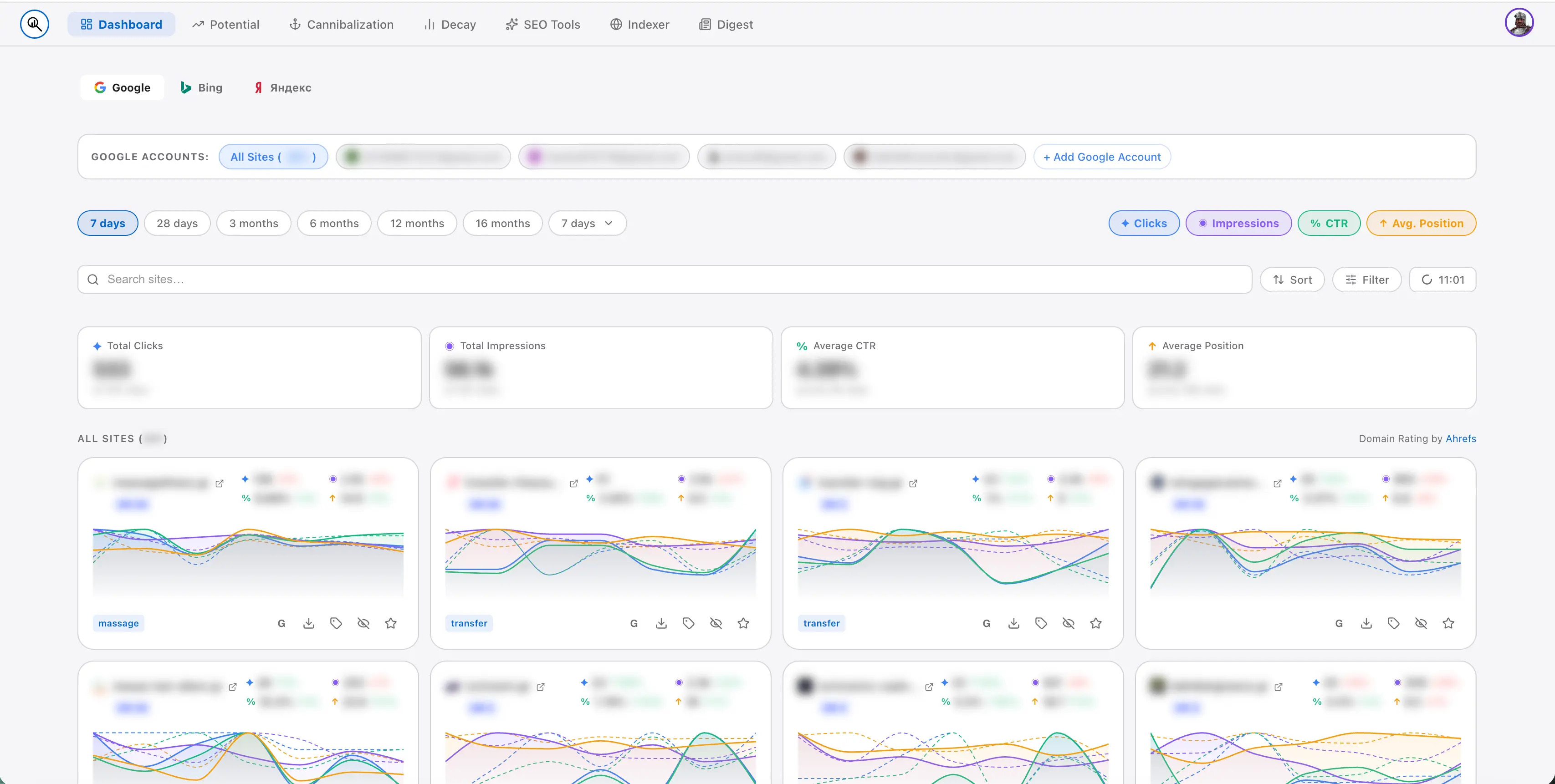
Main Dashboard
Unified view of all your GSC sites with key metrics at a glance.
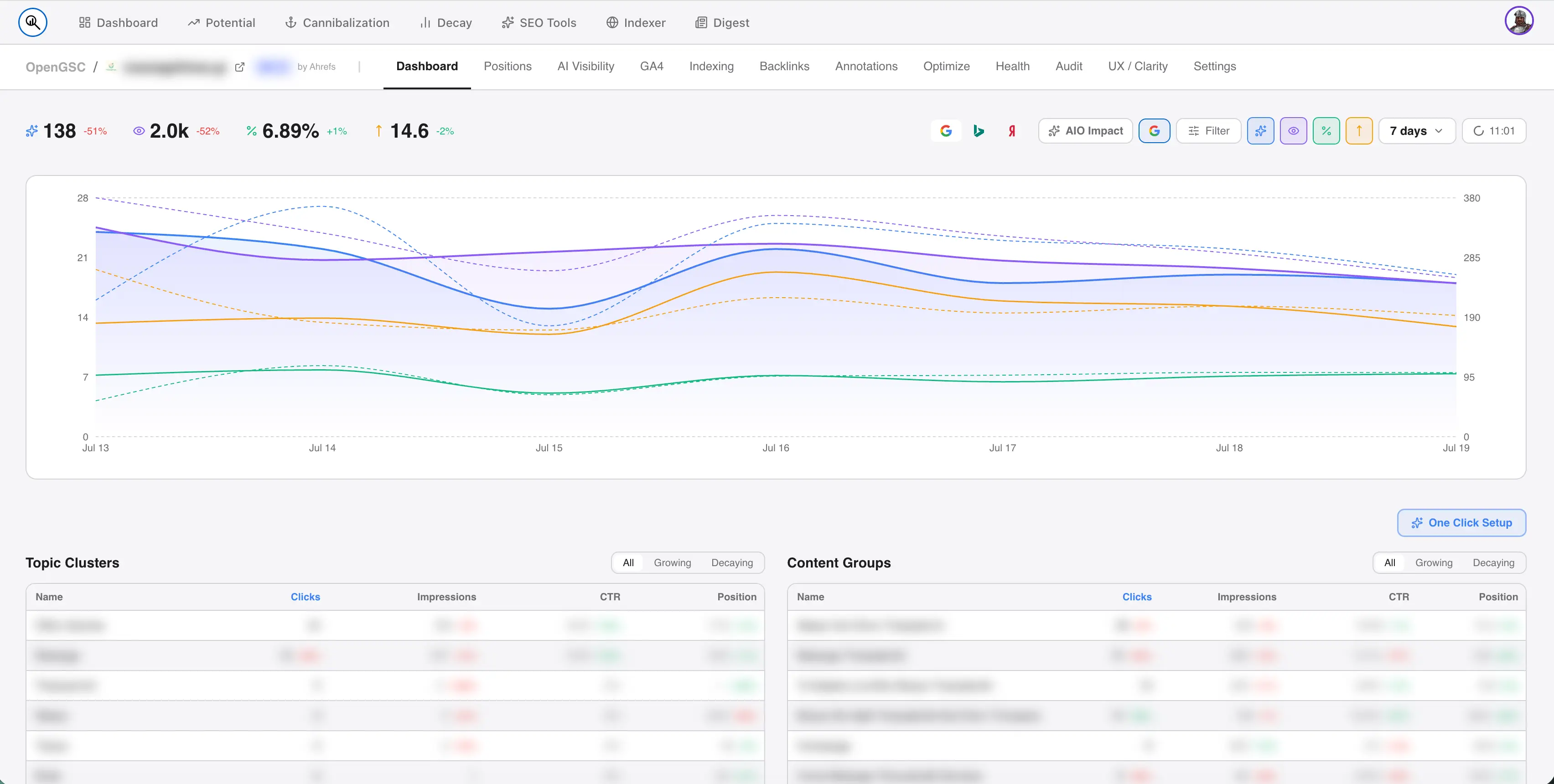
Site Dashboard
Detailed analytics for individual sites with comprehensive metrics.
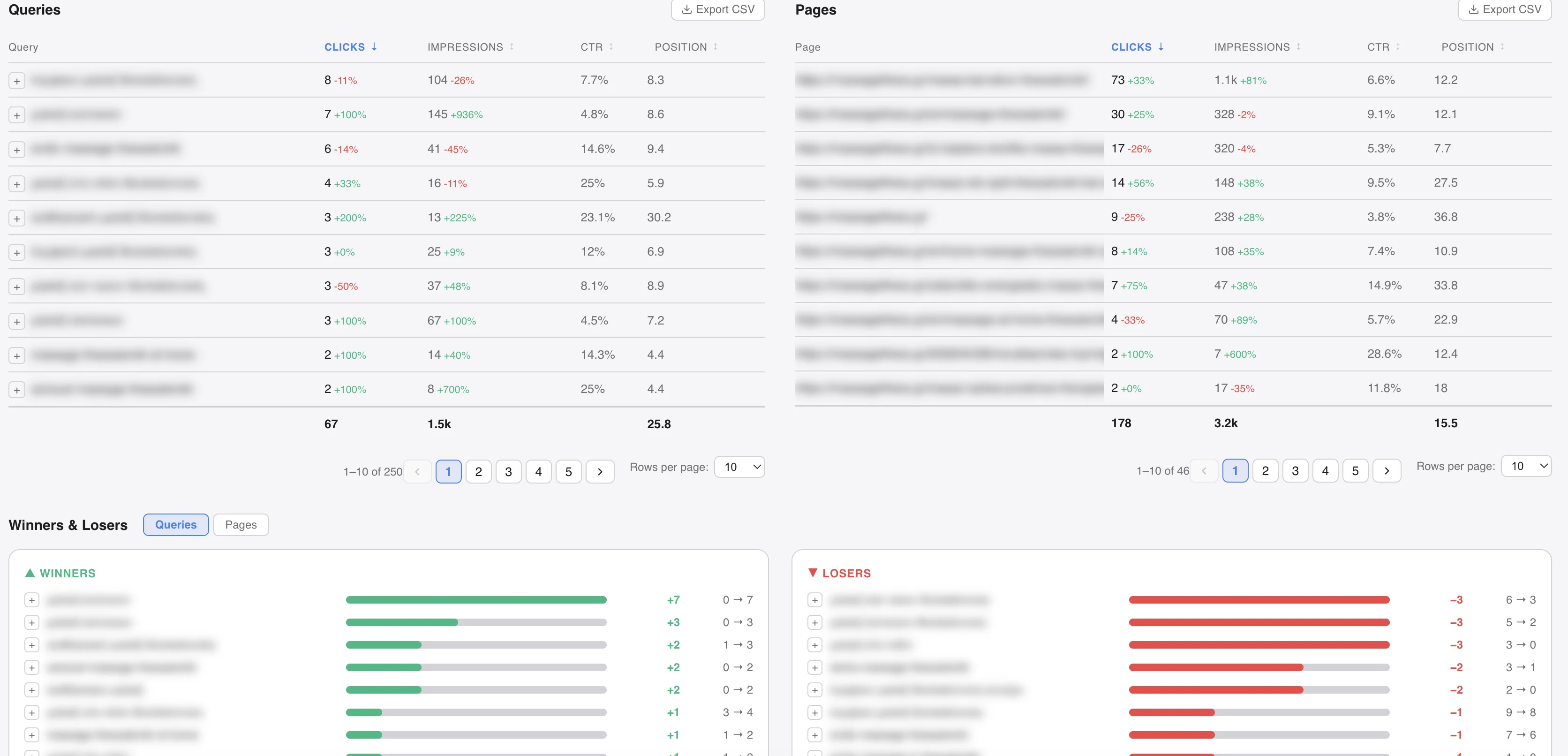
Site Data Overview
In-depth data visualization for clicks, impressions, and performance trends.
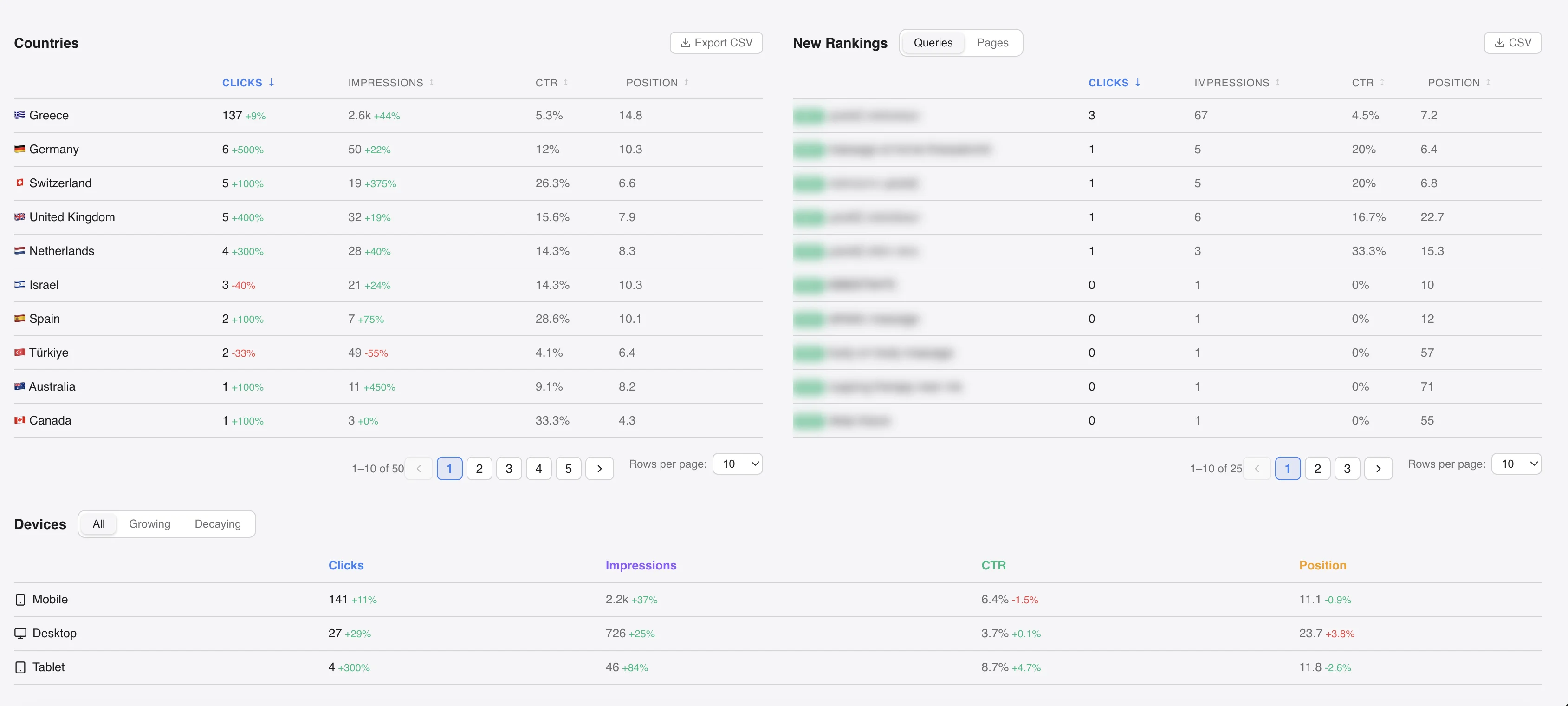
Country Analytics
Complete breakdown of your search traffic by country and region.
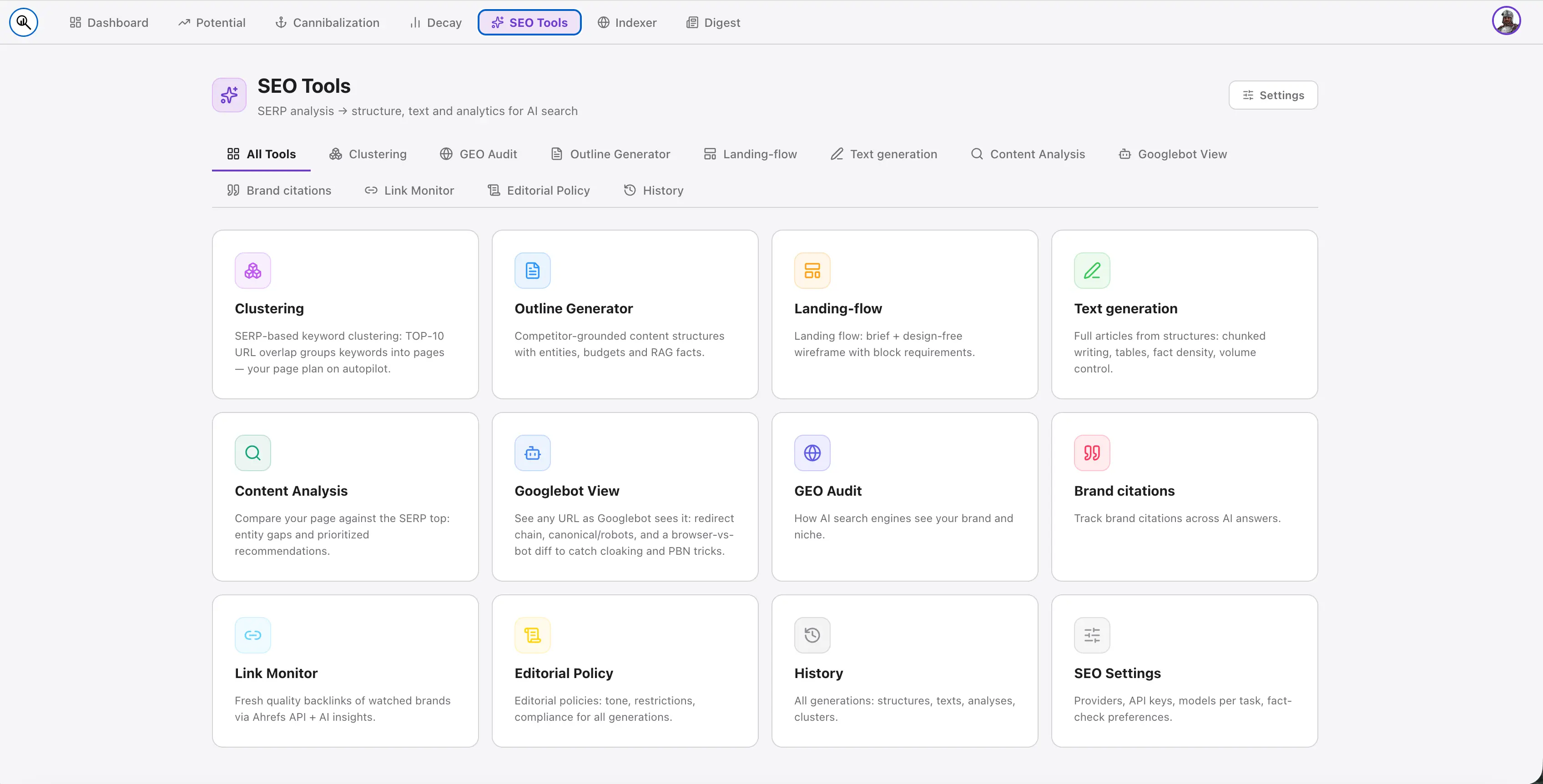
SEO AI Tools
AI-powered keyword generation and content analysis features.
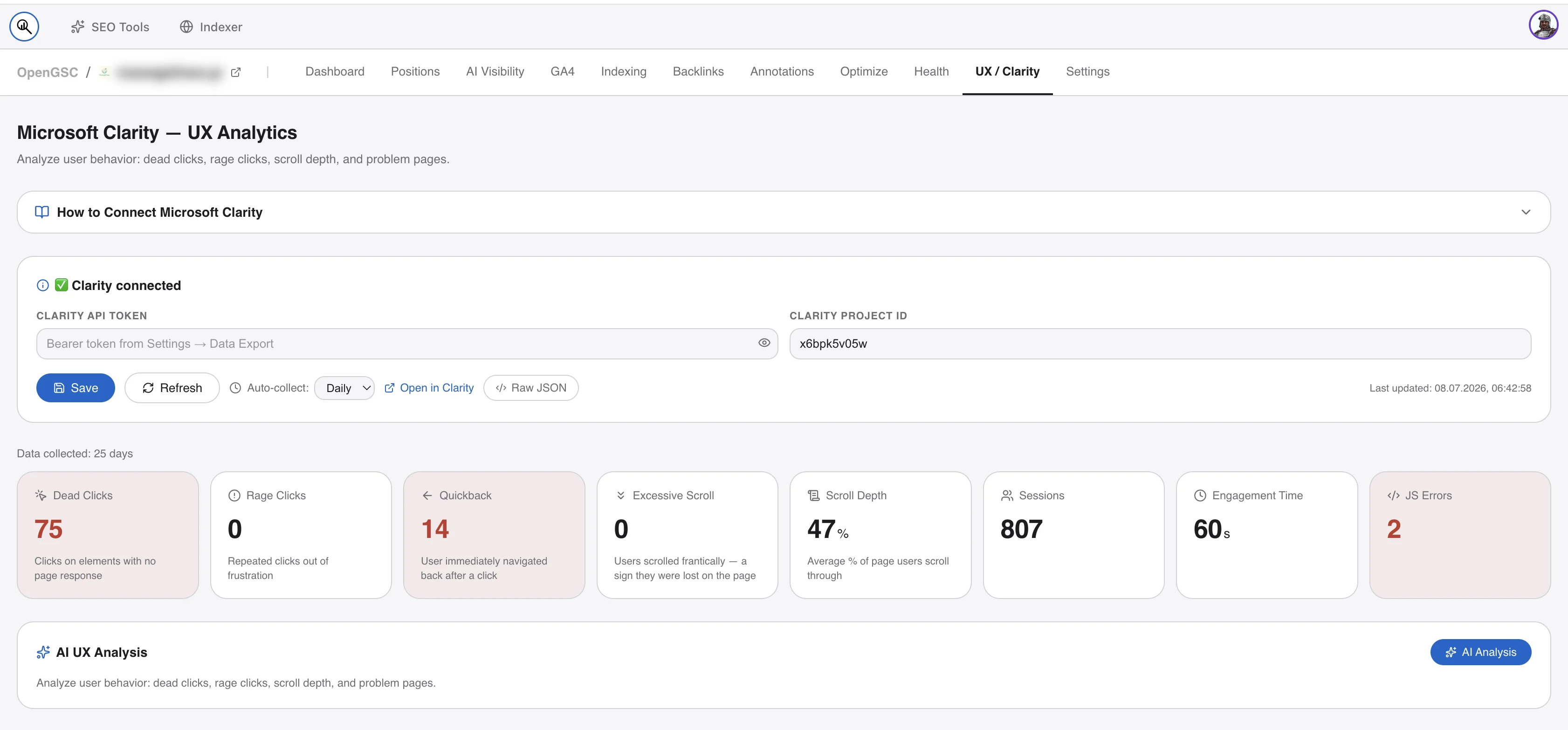
GA4 & Clarity Integration
Seamlessly connect Google Analytics 4 and Microsoft Clarity.
Up and running
in 3 steps
Deploy to any Ubuntu 22.04+ VPS. The installer handles Node.js, PM2, Nginx, and SSL automatically.
Create Google OAuth App
Set up Google Cloud Console in about 5 minutes. You'll need Client ID and Secret for the installer.
View detailed steps with direct links →
1. Create project: console.cloud.google.com/projectcreate — any name works
2. Enable Search Console API: console.cloud.google.com/apis/library/searchconsole.googleapis.com
3. Configure OAuth consent screen: console.cloud.google.com/auth/branding — choose External
4. Add test users: console.cloud.google.com/auth/audience — add your Google account
5. Create OAuth client: console.cloud.google.com/auth/clients/create — Web application
Authorized fields:
JavaScript origins: https://your-domain.com
Redirect URIs: https://your-domain.com/api/auth/callback/google
Tip: If sign-in fails with access_denied, your account isn't in Test users — add it or publish the app.
Run the installer
Connect to your VPS via SSH and run the command below. The script handles everything automatically.
View what gets installed →
- Node.js & PM2 setup
- Nginx reverse proxy
- Let's Encrypt SSL certificate
- Firewall (UFW) configuration
- App deployed to
/root/opengsc
Sign in & Add Accounts
Open your domain in a browser. First Google login makes you the owner. Add more accounts in Settings.
View troubleshooting tips →
Common issues:
• redirect_uri_mismatch — check that NEXTAUTH_URL matches your domain exactly
• access_denied — your Google account isn't in Test users (step 1.4)
curl -fsSL https://raw.githubusercontent.com/fenjo26/opengsc/main/install.sh | sudo bash
Any cheap VPS will do
A $5/month VPS from Hetzner, DigitalOcean, or any provider running Ubuntu 22.04+ is more than enough.
| Parameter | Minimum | Recommended |
|---|---|---|
| Operating System | Ubuntu 22.04 LTS | Ubuntu 22.04 / 24.04 LTS |
| CPU | 1 vCPU | 2 vCPU |
| RAM | 1 GB | 2 GB |
| Storage | 10 GB SSD | 20 GB SSD |
| Node.js | Installed automatically by install.sh |
|
Built on proven,
boring technology
No exotic dependencies. Everything runs in a single Node.js process with a local SQLite database. Extended with modern AI APIs and messaging integrations.
Common questions
Is it really free?
↓
Yes, completely. OpenGSC is open source (MIT license). You only pay for your own VPS — typically $4–6/month. No subscription, no usage limits, no hidden fees.
I'm getting redirect_uri_mismatch when signing in
↓
redirect_uri_mismatch when signing inThe NEXTAUTH_URL in your .env doesn't match the Authorized redirect URI in Google Cloud Console. They must be identical — including http:// vs https://. The redirect URI must be YOUR_DOMAIN/api/auth/callback/google.
Can I add multiple Google accounts?
↓
Yes. After signing in with your main account, go to Settings → My Google Accounts and connect as many accounts as you like. Sites from all accounts appear on the dashboard automatically.
Does OpenGSC support AI keyword generation?
↓
Yes! OpenGSC includes SEO AI Tools that support keyword generation and content analysis. You can use your own API key from Anthropic, OpenAI, Gemini, or OpenRouter. You pay only for what you use — no markup.
Can I integrate Google Analytics 4 and Microsoft Clarity?
↓
Yes, OpenGSC supports integration with both Google Analytics 4 and Microsoft Clarity. Connect them in Settings to see comprehensive user behavior analytics alongside your GSC data.
Is there a standalone indexing tool?
↓
Yes! OpenGSC includes a standalone indexer that lets you submit URLs directly to Google for faster indexing. No need to leave the dashboard or use external tools.
Does OpenGSC support Bing and Yandex?
↓
Yes! OpenGSC supports multiple search engines including Google, Bing, and Yandex. You can connect all your search console accounts and see unified analytics across platforms.
Can I perform bulk operations on multiple sites?
↓
Absolutely! OpenGSC includes bulk operations for managing hundreds of sites simultaneously. You can perform mass URL inspections, batch updates, and manage multiple sites efficiently.
What is MCP support in OpenGSC?
↓
OpenGSC includes a fully functional MCP (Model Context Protocol) server. This allows AI agents and tools to connect directly to your SEO data, enabling powerful integrations and automated analysis workflows.
Is Telegram integration available?
↓
Yes! You can connect OpenGSC to Telegram for real-time alerts and notifications. Get updates about your sites, ranking changes, and important metrics directly in your Telegram chat.
How do I update to a new version?
↓
Use the following commands in your terminal:
cd /root/opengsc
git pull
npm install
npx prisma migrate deploy
npm run build
pm2 restart opengsc
Ready to own
your SEO data?
Deploy in 5 minutes. No credit card, no subscription.